
Screen-time rules are easy to state and surprisingly hard to enforce, especially when a toddler is already absorbed in a favorite show or game. Instead of repeating "time's up" until everyone is frustrated, I use a few simple visual cues that show when a device is available, where it goes when it's done, and what happens next. The goal is to make the routine predictable enough that I don't have to turn every shutdown into an argument.
Give Every Device a Visible Charging Spot
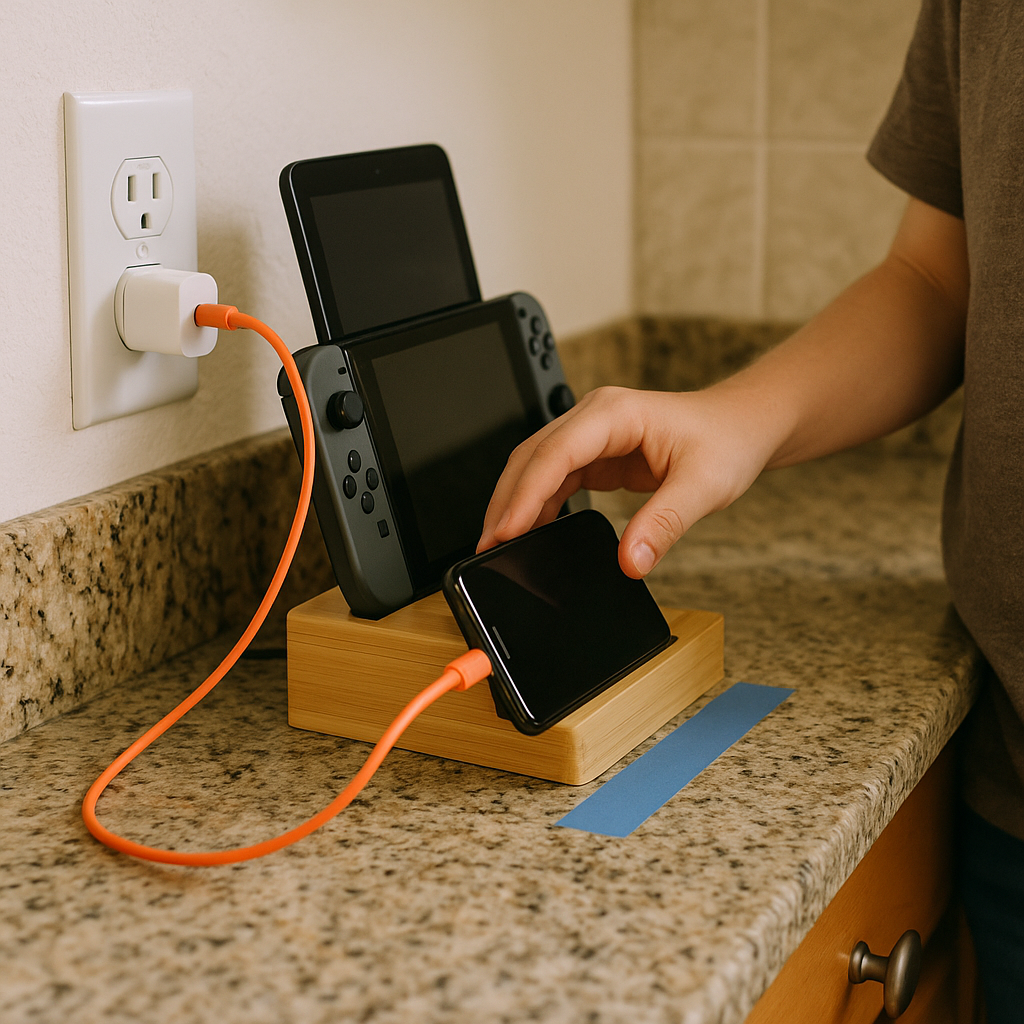
I stopped trying to win the verbal chess match of "two more minutes" and moved the whole boundary into a physical place: one charger, one outlet, one spot. Ours is a little bamboo charging stand on the kitchen counter, taped down with museum putty because a determined toddler will absolutely test whether it can be carried away like treasure. Every device that matters in our house, the iPad, the Switch, my phone when I'm not using it, goes to that stand when it's not in use.
Here's what changed once the charger became the "home": the conversation shifted from me being the bad guy to the room being the rule. If the screen isn't in your hands, it's on the stand. If it's on the stand, it's off. I don't negotiate. I just walk over, plug it in, and let the cord do the talking. For young toddlers, a simple visual cue can make a familiar transition easier to anticipate.
Make it annoyingly obvious. Use a short, bright cable (a 3-ft cable is my sweet spot because it won't reach the couch) and put a strip of painter's tape on the counter like a parking spot. If your kid is into buttons, flip the stand so they can't reach the power switch. If you've got multiple caregivers, label it with a Sharpie right on the tape: CHARGE. Once the routine sticks, you may find yourself pointing instead of repeating the rule. You'll still have feelings about it, but you won't have to perform them out loud six times a night.
Use a Simple Yes/No Cue for Screen Time

Screen rules can become harder to enforce when they're delivered differently from one day to the next. So I made one tiny prop that stays attached to the actual device: a laminated card on a key ring that says YES on one side and NO on the other. It sounds silly. It cut down on some of the arguing in our house because it turned boundary-setting into a quick, visible check instead of an on-the-spot debate.
I made it with cardstock, a laminating pouch, and a single-hole punch. Then I used a small key ring and looped it through the iPad case handle. If you don't have a case with a handle, you can loop it through a corner lanyard hole or attach it to the case with a stick-on phone lanyard tab (the kind that slides inside the case and leaves a little loop at the charging port). The words don't have to be YES/NO, by the way. For toddlers, I like a green checkmark and a red stop sign because it's instant.
How we use it: when it's a screen window, the card shows YES before the device even comes out. When it's not, the card sits on NO all day. If my kid asks, I point to the card and give a brief explanation when needed. They hate it the first few times. Then it becomes weirdly comforting because the answer isn't hiding in my head. And when I'm tempted to cave, that card is staring at me too, which is the part no one tells you. It's a cue for the grown-ups as much as for the kids.
One practical tip: don't make the YES side mean unlimited. Ours means one specific thing that a toddler can understand visually: a 20-minute sand timer on the counter. They can see the timer and the card. When the timer runs out, the card flips to NO, and the device goes to the charger home. Clean, quick, repeatable.
Use a Visual Routine for Ending Screen Time
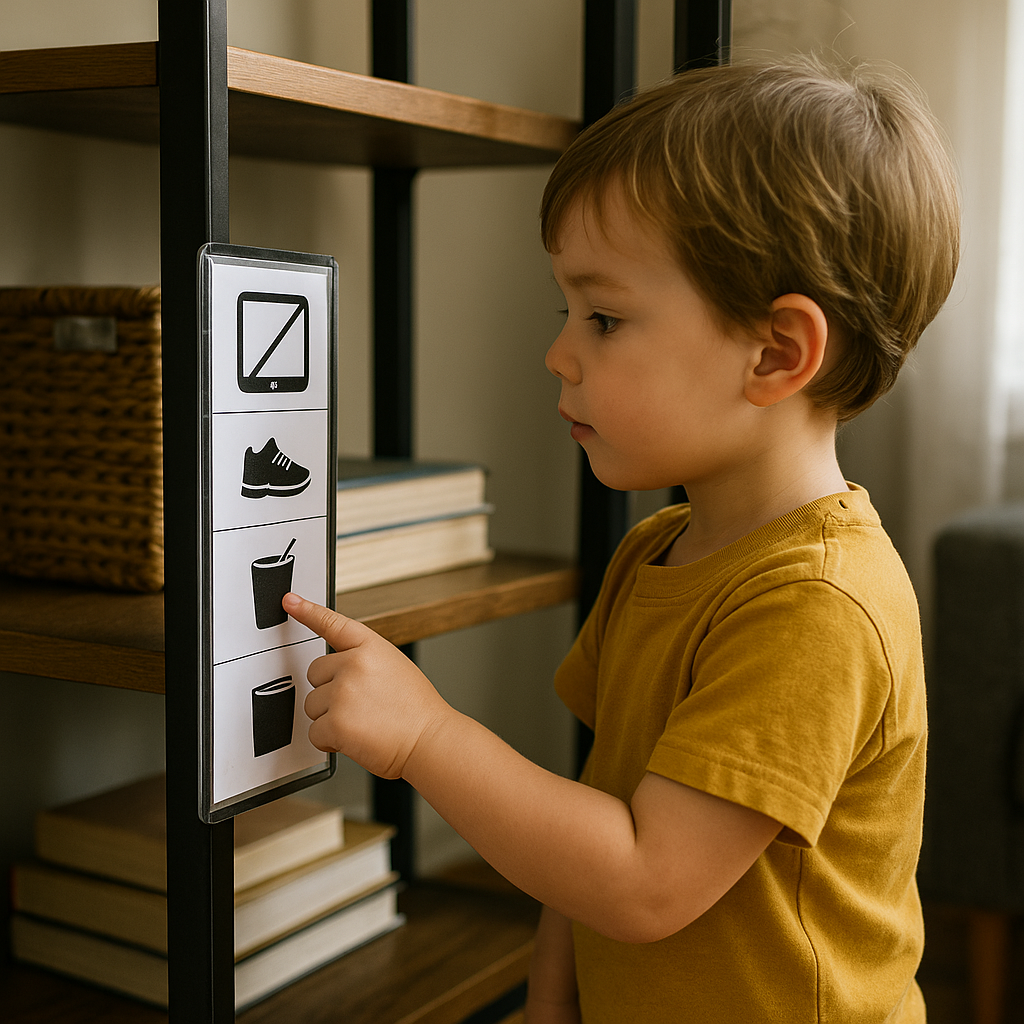
If your fights happen at the transition rather than the start, a rule won't help. A visual sequence will. I learned this the hard way in the baby-to-toddler stretch, where everything is a mood swing, and every all done sounds like betrayal. What finally worked for us was a little routine strip with three icons, stuck at kid height near the living room shelf: (1) screen, (2) body, (3) snack or book.
I printed simple black-and-white icons, slid them into a cheap magnetic photo sleeve, and stuck it on the side of a metal bookshelf. If you don't have magnets, Velcro dots on a wall or the side of a toy bin work fine. The key is that your kid can walk up and touch each step. I keep the pictures literal: a tablet with a slash for done, a pair of shoes for outside, or a kid doing a stretch for move, and then either a cup with a straw (we do water first, always) or a book.
Here's the part that felt almost too basic but mattered: I stopped talking during the handoff. I point. My kid taps the first icon, then the second, then the third. That physical action gives them something predictable to do while they make the transition. On rough days, I let them carry the routine strip to the kitchen like it's important paperwork. It keeps their hands busy and their attention forward.
Make the middle step change the sensory channel. For us, that's movement: pushing a laundry basket, doing five wall pushes (palms on the wall, little body leaning), or stomping to the front door to put on shoes. For a younger toddler, it might be a quick cuddle plus a song before you move to the next thing. The point is to make the next step visible before the screen goes dark.